Indexer from scratch
Here's an example of how SDK packages can be combined into a working indexer (called squid).
This page goes through all the technical details to make the squid architecture easier to understand. If you would like to get to a working indexer ASAP, bootstrap from a template.
USDT transfers API
Pre-requisites: NodeJS 20.x or newer, Docker.
Suppose the task is to track transfers of USDT on Ethereum, then save the resulting data to PostgreSQL and serve it as a GraphQL API. From this description we can immediately put together a list of packages:
@subsquid/evm-processor- for retrieving Ethereum data- the triad of
@subsquid/typeorm-store,@subsquid/typeorm-codegenand@subsquid/typeorm-migration- for saving data to PostgreSQL
We also assume the following choice of optional packages:
@subsquid/evm-typegen- for decoding Ethereum data and useful constants such as event topic0 values@subsquid/evm-abi- as a peer dependency for the code generated by@subsquid/evm-typegen@subsquid/graphql-server/ OpenReader
To make the indexer, follow these steps:
-
Create a new folder and initialise a new project
- create
package.jsonnpm init - add
.gitignore.gitignorenode_modules
lib
- create
-
Install the packages:
npm i dotenv typeorm @subsquid/evm-processor @subsquid/typeorm-store @subsquid/typeorm-migration @subsquid/graphql-server @subsquid/evm-abinpm i typescript @subsquid/typeorm-codegen @subsquid/evm-typegen --save-dev -
Add a minimal
tsconfig.json:tsconfig.json{
"compilerOptions": {
"rootDir": "src",
"outDir": "lib",
"module": "commonjs",
"target": "es2020",
"esModuleInterop": true,
"skipLibCheck": true,
"experimentalDecorators": true,
"emitDecoratorMetadata": true
}
} -
Define the schema for both the database and the core GraphQL API in
schema.graphql:schema.graphqltype Transfer @entity {
id: ID!
from: String! @index
to: String! @index
value: BigInt!
} -
Generate TypeORM classes based on the schema:
npx squid-typeorm-codegenThe TypeORM classes are now available at
src/model/index.ts. -
Prepare the database:
- create
.envanddocker-compose.yamlfiles.envDB_NAME=squid
DB_PORT=23798
RPC_ETH_HTTP=https://rpc.ankr.com/ethdocker-compose.yamlservices:
db:
image: postgres:15
environment:
POSTGRES_DB: "${DB_NAME}"
POSTGRES_PASSWORD: postgres
ports:
- "${DB_PORT}:5432" - start the database container
docker compose up -d - compile the TypeORM classes
npx tsc - generate the migration file
npx squid-typeorm-migration generate - apply the migration with
npx squid-typeorm-migration apply
- create
-
Generate utility classes for decoding USDT contract data based on its ABI.
-
Create an
./abifolder:mkdir abi -
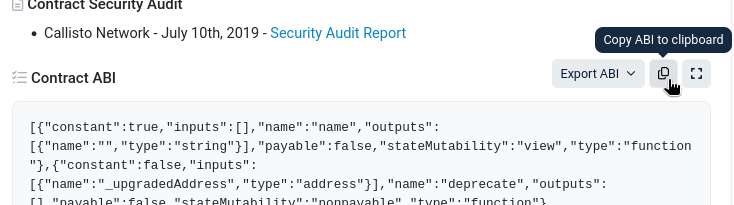
Find the ABI at the "Contract" tab of the contract page on Etherscan. Scroll down a bit:
-
Copy the ABI, then paste to a new file at
./abi/usdt.json. -
Run the utility classes generator:
npx squid-evm-typegen src/abi ./abi/*
The utility classes are now available at
src/abi/usdt.ts -
-
Tie all the generated code together with a
src/main.tsexecutable with the following code blocks:- Imports
import { EvmBatchProcessor } from '@subsquid/evm-processor'
import { TypeormDatabase } from '@subsquid/typeorm-store'
import * as usdtAbi from './abi/usdt'
import { Transfer } from './model' EvmBatchProcessorobject definitionconst processor = new EvmBatchProcessor()
.setGateway('https://v2.archive.subsquid.io/network/ethereum-mainnet')
.setRpcEndpoint({
url: process.env.RPC_ETH_HTTP,
rateLimit: 10
})
.setFinalityConfirmation(75) // 15 mins to finality
.addLog({
address: [ '0xdAC17F958D2ee523a2206206994597C13D831ec7' ],
topic0: [ usdtAbi.events.Transfer.topic ]
})TypeormDatabaseobject definitionconst db = new TypeormDatabase()- A call to
processor.run()with an inline definition of the batch handlerNote how supplying aprocessor.run(db, async ctx => {
const transfers: Transfer[] = []
for (let block of ctx.blocks) {
for (let log of block.logs) {
let {from, to, value} = usdtAbi.events.Transfer.decode(log)
transfers.push(new Transfer({
id: log.id,
from, to, value
}))
}
}
await ctx.store.insert(transfers)
})TypeormDatabaseto the function causedctx.storeto be a PostgreSQL-compatibleStoreobject.
- Imports
-
Compile the project and start the processor process
npx tscnode -r dotenv/config lib/main.js -
In a separate terminal, configure the GraphQL port and start the GraphQL server:
.envDB_NAME=squid
DB_PORT=23798
RPC_ETH_HTTP=https://rpc.ankr.com/eth
+GRAPHQL_SERVER_PORT=4350npx squid-graphql-server
The finished GraphQL API with GraphiQL is available at localhost:4350/graphql.
Final code for this mini-tutorial is available in this repo.
The commands listed here are often abbreviated as custom sqd commands in squids. If you'd like to do that too you can use the commands.json file of the EVM template as a starter.